






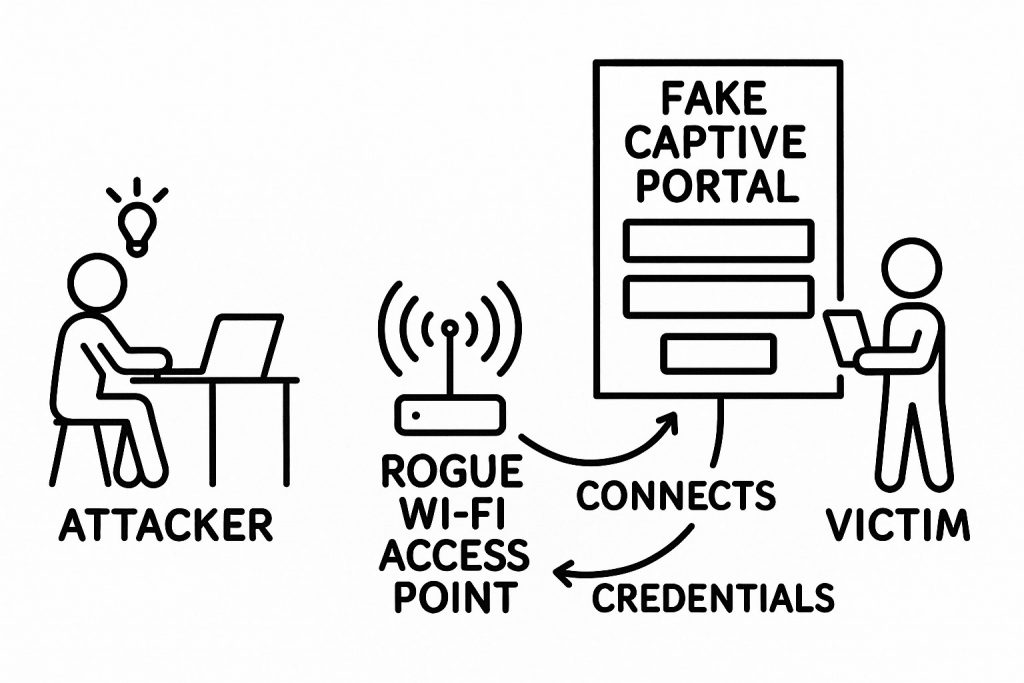
Expanded definition of Rogue Captive Portals from Page 119 – The Weight of Technology
If you’ve ever opened your laptop in an airport or coffee shop and been greeted by a “Welcome! Please accept our terms to get online” page, you’ve met a captive portal.
Now imagine that splash page isn’t from the airport at all. It looks right. Same logo. Same colors. Same “Free Wi-Fi courtesy of…” language. But it’s controlled by an attacker sitting a few seats away.
That’s a rogue captive portal—and it’s one of the most effective ways to turn everyday Wi-Fi into a credential-stealing, surveillance-friendly trap.
This article breaks down what rogue captive portals are, how they work, why attackers love them, the risks and vulnerabilities involved, and how to protect yourself—staying true to the “lift the curtain on hidden tech” style of jeremyabram.net.
1. Captive Portals 101 (The Legitimate Kind)
A captive portal is the web page that pops up when you connect to many public or semi-public Wi-Fi networks (airports, hotels, cafés, universities, corporate guest networks, etc.). It usually:
- Makes you:
- Accept terms of service
- Enter a room number or ticket code
- Log in with an account or social login
- Only lets you access the wider internet after you’ve gone through that page
Under the hood, a typical captive portal works like this:
- Your device connects to the Wi-Fi access point.
- You’re given an IP address via DHCP like on any normal network.
- When your device tries to reach a website:
- The network intercepts your HTTP request or DNS query.
- Instead of sending you to your intended site, it redirects you to the portal page.
- After you’ve authenticated/accepted terms, the network:
- Marks your device (MAC address, IP, or session token) as “authorized,” and
- Allows your traffic to pass normally.
Many operating systems even auto-detect captive portals by making a small test HTTP request (e.g., to a known URL) and popping up a mini-browser or “Sign in to Wi-Fi network” dialog when they see the redirection.
When run by a legitimate provider, captive portals are mostly about:
- Access control (who can use the network)
- Metering (time limits, bandwidth quotas)
- Legal comfort (logging consent, tracking abuse)
2. What Is a Rogue Captive Portal?
A rogue captive portal is a malicious imitation of that login/acceptance page—usually delivered over a rogue or “evil twin” Wi-Fi access point that pretends to be a legitimate public network.
An evil twin is a fraudulent Wi-Fi access point that mimics a real network (same or similar name/SSID, sometimes stronger signal) and exists to eavesdrop on or manipulate traffic. Wikipedia+2pandasecurity.com+2
The attacker:
- Sets up a fake Wi-Fi network with a believable name (e.g.,
Airport_Free_WiFi,HotelGuest,CoffeeShop_Guest). - Uses that network to serve a fake captive portal that:
- Imitates a real login or payment screen, or
- Imitates a major service (e.g., “Google login required to access Wi-Fi”).
- Collects anything you type into it: email, password, SMS codes, card details—even corporate SSO credentials.
This is not hypothetical. Evil twin networks and phishing portals are recognized techniques in MITRE ATT&CK (Adversary-in-the-Middle: Evil Twin). MITRE ATT&CK In 2024 and 2025, multiple real-world cases involved attackers running fake Wi-Fi to harvest credentials on flights and in airports, leading to criminal charges and prison sentences. Wikipedia+1
3. How Rogue Captive Portals Actually Work
Let’s walk through a typical attack flow from the attacker’s point of view.
Step 1: Set Up the Fake Wi-Fi
The attacker:
- Brings a laptop, small single-board computer, or Wi-Fi device.
- Configures it as an access point:
- SSID: something that looks legit (e.g.,
Delta_WiFiorAirport_Free_WiFi_2). - Often uses the same SSID as the real network (the “evil twin” approach). Wikipedia+2Kaspersky+2
- SSID: something that looks legit (e.g.,
They might even:
- Use more transmit power or a closer signal so your device prefers their network.
- Clone the MAC address/BSSID of the real access point for extra believability.
Step 2: Push Users onto the Rogue Network
To get victims to connect, attackers may:
- Rely on human behavior: people choose the strongest or most convenient “Free Wi-Fi” entry.
- Exploit auto-join:
- If your device remembers
Airport_Free_WiFi, it may automatically connect to the attacker’s evil twin using the same name.
- If your device remembers
- Launch deauthentication attacks:
- Send forged deauth frames to disconnect users from the real AP.
- Your device auto-reconnects—to the attacker’s twin with the stronger signal. Census Labs+1
Once you’re associated with the rogue AP, the attacker is effectively the network.
Step 3: Intercept and Redirect Your Traffic
The rogue access point:
- Runs DHCP to give you an IP address.
- Runs a DNS server or transparent proxy that:
- Responds to any domain with the attacker’s server address, or
- Passes through some domains but hijacks the first few requests.
- When your browser (or OS) tries to load any page:
- The attacker’s HTTP server responds with a captive portal instead of the site you asked for.
This portal might be:
- A clone of the venue’s real Wi-Fi login page.
- A “Sign in with Google/Office 365/Facebook” page that looks convincing.
- A “Your session expired, please re-authenticate” page targeting enterprise users.
Tools like Wifiphisher automate much of this process, combining rogue access points, automatic association attacks, and phishing-style captive portals to steal credentials or deliver malware. Scribd+3Wifiphisher+3GitHub+3
Step 4: Harvest Credentials and Potentially Bypass Encryption
Once your browser shows the fake portal:
- Anything you type—username, password, 2FA codes, credit card details—goes directly to the attacker.
- If they’re sophisticated, they might:
- Perform Adversary-in-the-Middle (AiTM) attacks, relaying your login to the real service in real time, capturing session cookies or tokens. MITRE ATT&CK+1
- Exploit design flaws in captive portal behavior to weaken or bypass HTTPS protections. One research paper describes a “Man-in-the-Portal” attack that leverages captive portal redirection to effectively disable SSL/TLS and allow eavesdropping and tampering. J-STAGE
After they get what they want, the portal may:
- Show a “Success, you’re connected!” message.
- Then simply route your traffic out to the real internet, so nothing feels suspicious.
All you remember is: “The airport Wi-Fi was a bit weird, but it worked.”
4. What Attackers Use Rogue Captive Portals For
Rogue captive portals are attractive because they combine Wi-Fi control with the psychological power of familiar login screens.
Common Malicious Uses
- Credential Theft
- Email, social media, cloud storage, and banking logins.
- Enterprise SSO (Okta, Azure AD, Google Workspace), VPN credentials, and MFA codes.
- Reuse of stolen credentials across multiple accounts.
- Session and Token Hijacking
- If the attacker relays your login in real time, they can capture session cookies or tokens and bypass passwords/MFA entirely.
- Malware Distribution
- “To use Wi-Fi, please install this security update/client/plug-in.”
- Drive-by downloads that push trojans, adware, or remote-control tools.
- Traffic Interception and Manipulation
- Sniffing unencrypted HTTP traffic and metadata.
- Injecting ads, cryptominers, or modified content.
- Manipulating what you see (fake banking balances, fake error pages, etc.).
- Surveillance and Tracking
- Mapping devices to people and behaviors (MAC addresses, device types).
- Correlating your visits across venues or over time.
“Legitimate” Uses: Red Teaming & Security Testing
Not all rogue captive portals are used by criminals. Security teams, penetration testers, and educators use the same techniques to:
- Test how well staff recognize suspicious Wi-Fi.
- Evaluate corporate Wi-Fi security posture.
- Train users and measure phishing resilience in real-world conditions.
Frameworks like Wifiphisher and similar tools explicitly position themselves for red team engagements and Wi-Fi security testing, not for criminal abuse. Wifiphisher+2GitHub+2
Understanding how these attacks work is part of building better defenses.
5. Why Rogue Captive Portals Are So Effective (Attacker “Advantages”)
From an attacker’s perspective, rogue captive portals have several big advantages over many other attack types:
- They Look Normal
Captive portals are expected on public Wi-Fi. A “Please log in to access the internet” page doesn’t trigger alarm bells by default. - They Exploit Auto-Behavior
- Devices auto-join known SSIDs.
- OS captive portal detection auto-opens a mini-browser that you reflexively click through.
- They’re Cheap and Portable
- Commodity hardware (a laptop or small embedded device) is enough.
- Can be run from a backpack in a crowded place.
- They Are Service-Agnostic
Instead of trying to brute-force individual sites, you funnel all victim traffic through your portal and decide what to target on the fly. - They Can Bypass Some Encryption Defenses
- Users are used to seeing captive portals over HTTP (not HTTPS), so the lack of a lock icon doesn’t always register.
- Some research demonstrates ways to leverage captive portal flows to weaken or bypass TLS protections (MITP attacks). J-STAGE
- They Scale Social Engineering
- One rogue AP can harvest credentials from many victims in a busy area.
- Tools automate the setup, redirection, and phishing scenarios. Wifiphisher+2Wifiphisher+2
From a defender’s perspective, the “advantage” of knowing this is simple: you’re far more likely to spot the trap once you understand why it’s attractive to attackers.
6. Risks and Impacts for Everyday Users
For individuals, rogue captive portals turn a momentary “free Wi-Fi” decision into a long-term security problem.
Direct Risks
- Account Takeover
- Email accounts → password resets for everything else.
- Cloud storage → exposure of personal documents and IDs.
- Social media → impersonation, scams targeting your contacts.
- Banking or payment logins → direct financial theft or fraud.
- Workplace Compromise
- Stolen corporate credentials → access to internal systems, VPNs, cloud dashboards.
- May enable lateral movement inside an organization’s network.
- Device Compromise
- Malware installs that persist after you disconnect from Wi-Fi.
- Keyloggers or remote access tools that continue to capture data.
- Privacy and Metadata Exposure
- Even if you don’t type passwords, the attacker may observe:
- What sites you visit
- Device type, OS, apps phoning home
- Useful for profiling or targeted attacks later.
- Even if you don’t type passwords, the attacker may observe:
Longer-Term Consequences
- Identity theft and account recovery nightmares.
- Damage to work, reputation, or client data if corporate accounts were involved.
- Difficulty tracing the incident back to “that one time” you used airport Wi-Fi—making it harder to understand what happened.
7. Vulnerabilities and Weak Points Being Exploited
Rogue captive portals sit at the intersection of technical and human vulnerabilities.
7.1 Technical Weaknesses
- Wi-Fi Trust Model
- Wi-Fi SSIDs are just text strings; there’s no built-in guarantee that
Airport_Free_WiFiis controlled by the airport. - Many devices auto-connect to known SSIDs without checking if the BSSID or certificates changed.
- Wi-Fi SSIDs are just text strings; there’s no built-in guarantee that
- Captive Portal Architecture
- Captive portals rely heavily on HTTP redirection and DNS interception, which are trivially mimicked by attackers.
- Because captive portals often start as unencrypted HTTP pages, users are primed to accept a less secure experience.
- OS Captive Portal Detection
- Operating systems send a simple HTTP request to a known URL and expect a very specific response.
- A rogue network can fake the “captive portal” response, prompting a built-in browser even on legitimate HTTPS-only networks.
- TLS/SSL Misuse and Downgrade Opportunities
- Research has demonstrated that flaws in captive portal flows can be abused to weaken SSL/TLS protections (e.g., Man-in-the-Portal attacks that use the post-authentication redirect to disable HTTPS). J-STAGE
- Legacy and Misconfigured Wi-Fi
- Old or poorly configured networks that don’t enforce strong authentication (e.g., open Wi-Fi, weak WPA setups) make rogue APs easier to pull off.
- NIST and CISA guidance repeatedly calls out the dangers of rogue access points and emphasizes strong encryption, inventorying APs, and intrusion detection systems. NIST Computer Security Resource Center+3NIST Pages+3NIST Publications+3
7.2 Human Weaknesses
- Trust in Brands and Logos
- People see a familiar airline or hotel logo and stop questioning what site they’re really on.
- Speed and Convenience Over Security
- “I just need to send this email before boarding.”
- Security takes a back seat to urgency.
- Security Fatigue
- Constant cookie banners, consent forms, and login prompts train users to click “OK” without scrutiny.
- Poor Password Hygiene
- Reusing the same or similar passwords across services multiplies the impact of any single credential theft.
8. How to Defend Yourself Against Rogue Captive Portals
You can’t visually “see” radio waves—but you can build habits that drastically lower your risk.
8.1 Personal Defense Strategies
- Prefer Known, Secure Connections
- Use your phone’s hotspot instead of random free Wi-Fi when possible.
- Avoid doing sensitive logins (banking, password managers, work admin consoles) on public Wi-Fi at all, captive portal or not.
- Treat All Captive Portals as Untrusted
- Don’t enter:
- Work credentials
- Banking credentials
- Password manager master passwords
- If a Wi-Fi portal claims you must log in with Google/Microsoft/Facebook, be very suspicious—especially in airports or cafés.
- Don’t enter:
- Verify the Network With Staff
- Before connecting, ask: “What’s the exact Wi-Fi name you provide?”
- Be wary if you see multiple similar SSIDs (e.g.,
Airport_Free_WiFi,Airport_Free_WiFi1,Airport_Free_WiFi_FAST).
- Use a Reputable VPN—But Use It Correctly
- A VPN can:
- Encrypt your traffic over untrusted Wi-Fi
- Limit how much a rogue AP can see or tamper with
- Crucially:
- Don’t enter VPN credentials into random “Wi-Fi login portals.”
- Turn on the VPN immediately after you’re online and before visiting sensitive sites.
- A VPN can:
- Check the Browser Carefully
- Look for:
- A proper HTTPS lock icon on login pages.
- Correct domain names (e.g.,
https://accounts.google.com, nothttps://google.wifi-access-login.com).
- If the browser says the certificate is invalid or the connection is not private, back out.
- Look for:
- Enable Strong Account Security
- Use a password manager to generate unique credentials.
- Turn on MFA for important accounts.
- Prefer hardware security keys or app-based OTPs over SMS when possible (harder to capture and reuse via Wi-Fi phishing).
- Update Devices and Browsers
- Keep OS, browsers, and security tools updated; they increasingly include mitigations against misused captive portals and malicious certificates.
8.2 Organizational Defenses
If you’re responsible for a business or institution:
- Enforce Secure Wi-Fi Configurations
- WPA2-Enterprise or WPA3 with strong authentication.
- Disable or strictly limit open Wi-Fi.
- Monitor for Rogue APs
- Wireless intrusion detection/prevention systems (WIDS/WIPS).
- Regular surveys of RF environment to spot evil twins. NIST Publications+1
- Educate Staff and Users
- Security awareness training about evil twins and rogue portals.
- Clear guidance on when and how to use public Wi-Fi and VPNs.
- Harden Captive Portals
- Use TLS everywhere.
- Minimize data collection (don’t require sensitive identifiers if you don’t truly need them).
- Ensure branding and URLs are well-communicated so users can distinguish you from imitators.
9. The Bigger Picture: Captive Portals as a Design Problem
Rogue captive portals exploit more than just weak Wi-Fi—they exploit a design pattern that normalized:
- Intercepting user traffic without consent or clarity.
- Forcing users through unencrypted or confusing login flows.
- Training people to ignore browser security indicators “just to get online.”
As long as we keep designing connectivity around “click here, don’t ask questions,” attackers will keep borrowing that UX and painting it with their own objectives.
Understanding rogue captive portals is not about paranoia; it’s about reclaiming agency:
- Knowing what’s happening between your device and the air around you.
- Recognizing when “free Wi-Fi” is really just a very cheap trap.
- Choosing when to say: you know what, I’ll just use my own connection instead.




Leave a Reply